
By Robert J. Corn · Founder, AetherCut
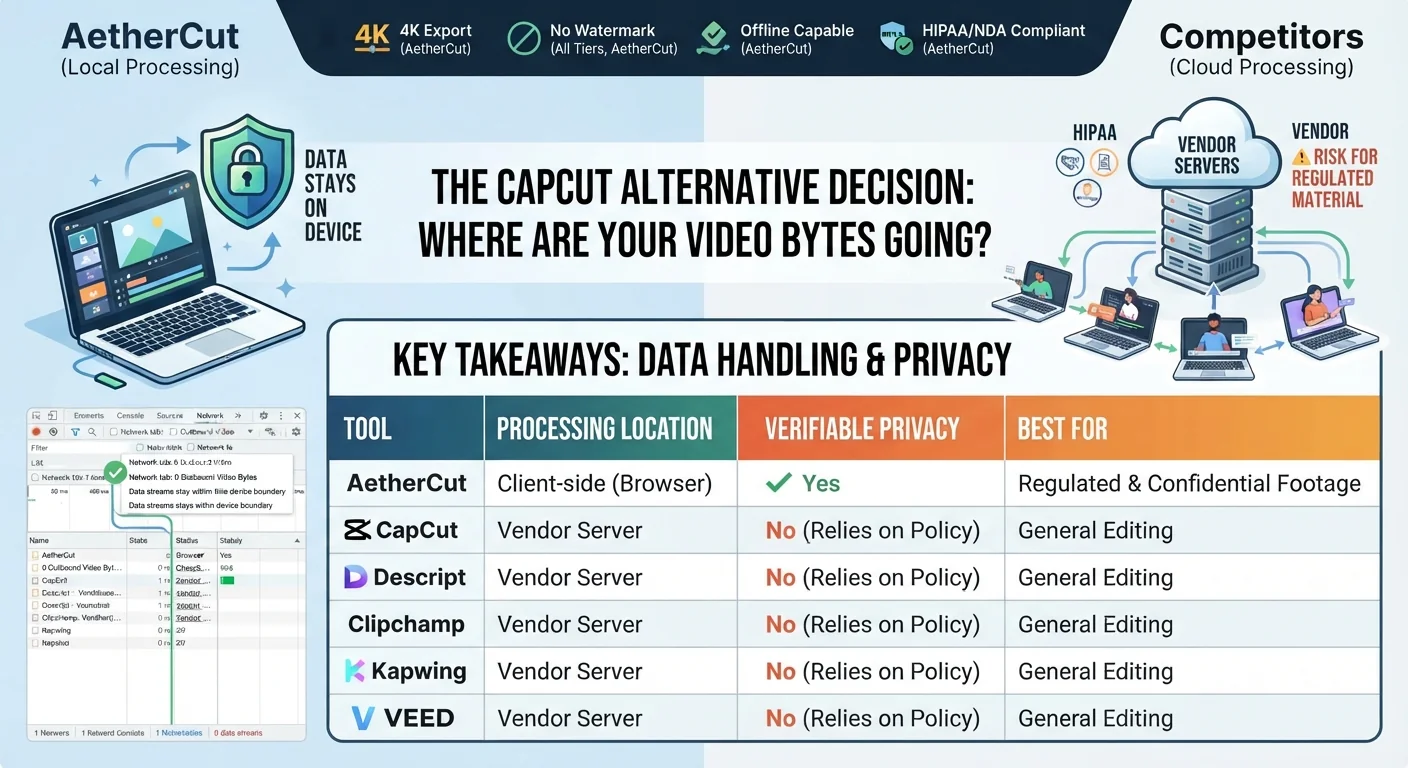
The best capcut video editor alternative depends on one question: does the tool process footage client-side, or send clips to a server? For lawyers, medical educators, and HR teams, that answer decides whether an editor is usable at all. This guide ranks alternatives on watermark policy, export limits, offline capability, and data handling.
Three reasons push people off CapCut: the data terms, watermark and export limits, and the pull toward a vendor's own ecosystem. Which one matters depends on what you edit.
If you cut deposition video, patient footage, or source-protected interviews, the deciding factor is data handling. Most browser editors process clips on remote servers, which is a non-starter under HIPAA, privilege, or an NDA. AetherCut processes locally, so you can watch the Network tab and confirm no video bytes leave the browser. For this reader, nothing else on the checklist matters as much. If you are weighing editors on privacy grounds, the Descript comparison covers the differences in detail.
If you trim videos twice a month, a recurring fee for a desktop suite is hard to justify. For you, watermark policy and export limits decide the pick, not the privacy architecture.
The honest answer is that every free tier here carries a catch, and the catch is rarely the watermark itself. CapCut, Descript, Clipchamp, Kapwing, and VEED all market free exports, but each ties that export to conditions that matter more than a logo in the corner: account requirements, resolution caps, export-length limits, or footage that transits their servers during processing. For a lawyer trimming a deposition or an HR team cutting internal training content, the binding constraint is not branding. It is whether the file can legally leave your machine at all.
The free-tier arithmetic only works if you separate the two costs. A watermark costs you polish; a data-handling failure can cost you a client, a privilege claim, or a compliance review. Suppose you are an employment lawyer with a 40-minute deposition clip: on a watermark-limited free tier you can trim it, caption it, and export it with a small logo, then decide whether that logo matters for the court filing, while on a server-processing free tier the same clip is uploaded, stored on infrastructure you do not control, and retained under terms you did not negotiate. The first problem is cosmetic and reversible; the second already happened by the time you saw the export button. That is why this guide treats export caps as a pricing question and data handling as a gating question, because if the gating question fails, the pricing question never gets asked, no matter how generous the free tier looks.
A watermark is visible, negotiable, and often removable on a paid tier. Data handling is not retroactively fixable. AetherCut takes a different position: no watermark on any tier, no account required to start editing, and processing that runs client-side, so you can open the Network tab and watch zero video bytes leave the browser. The trade-off is a narrower feature set than desktop editors, and section 7 covers that shortfall plainly. If you want to test the workflow before committing anything, the free video editor with no account lets you load a real clip and verify the behaviour yourself.
The table below turns the usual prose claims into checkable rows. "Data handling" means whether source footage is processed on your machine or on the vendor's servers.
| Tool | Free tier watermark | Export cap (free tier) | Offline capable | Data handling |
|---|---|---|---|---|
| CapCut | Yes on some exports | 1080p varies by tier | Desktop app only | Client requires account; footage processed by vendor |
| Descript | No watermark | Resolution tied to plan | No | Cloud processing required |
| Clipchamp | No on 1080p | 1080p free, 4K paid | No | Browser-based, processing handled by Microsoft's infrastructure |
| Kapwing | Yes on free tier | Length and size caps on free tier | No | Source clips go to its cloud for collaboration |
| VEED | Yes on free tier | 1080p on free tier | No | Browser-based, footage processed on vendor servers |
| AetherCut | No watermark on any tier | 4K export | Yes, works offline | Client-side via File System Access API; zero outbound video bytes, verifiable in DevTools |
The pattern: every browser-based competitor except AetherCut needs vendor servers for processing, because collaboration and rendering run there. If your footage is a deposition or patient recording, that single row decides the comparison. We break the CapCut trade-offs down further in our head-to-head.
CapCut, Descript, Clipchamp, Kapwing, and VEED.io all run in a browser tab, but none of them keeps working with no connection: each depends on remote processing for core features, so a dropped connection stalls your edit. None of the five is designed to open and cut footage with the network cable unplugged.
A browser tab is not the same as a private one. The question is not "does it run in Chrome?" but "where do the bytes go while it runs?" AetherCut is browser-based and processes video client-side through WebCodecs and WebGPU, so the Network tab shows zero outbound video bytes during an edit. That is verifiable in DevTools, not a policy claim. If you need a no-install option for deposition or patient footage, run that test on any candidate before trusting it.
The same client-side question applies to design tools, which we cover in the Canva comparison.
The difference is where processing happens. Clipchamp, CapCut, Descript, Kapwing, and VEED.io all run rendering and AI features on vendor servers, which means your footage transits and often resides on infrastructure you do not control. For a deposition recording or patient footage, that can breach HIPAA, privilege, or NDA terms regardless of the vendor's policy language.
AetherCut processes locally in the browser using WebCodecs and WebGPU, so no outbound video bytes leave your machine. We compare the specifics against Clipchamp in our Clipchamp comparison.
Open the Network tab, load a source clip, and scrub the timeline. Filter for large requests: any POST with a payload matching your file size means the footage is leaving the browser. Run this test on any editor before trusting it with regulated material, including ours.
Chromebooks have no native app for most of this category, so browser support decides everything. CapCut, Clipchamp, and Kapwing all run in a Chrome tab, but each moves processing work off your machine, so a weak CPU matters less than bandwidth. That trade helps low-spec hardware until you hit a 4K source clip, where the round-trip stalls on network speed rather than your processor.
AetherCut runs the opposite way: decoding, timeline playback, and export happen client-side through WebCodecs and WebGPU, so your Chromebook's own silicon does the work. A 2019-or-later Chromebook with 8 GB RAM handles 1080p timelines comfortably; 4K playback is where integrated graphics start dropping frames. Descript needs a desktop app for full features, which rules out most Chromebooks entirely.
The honest read: on a 4 GB machine, every option here struggles. Buy RAM before you buy an editor.
Run through our own table criteria, AetherCut loses in three places.
First, browser performance ceilings. WebCodecs and WebGPU decode 4K locally, but a 5-year-old laptop will drop frames on a multi-track timeline where a desktop NLE on native code would not. If your machine is the bottleneck, no amount of client-side architecture fixes it.
Second, collaboration. Kapwing processes source clips in its cloud so collaborators share project state. AetherCut keeps every byte on your machine, which means there is no shared state and no co-editing. For a two-person HR team reviewing the same cut, that is a real gap.
Third, feature gaps versus desktop NLEs: no motion graphics compositor, no plugin ecosystem, and audio mixing is basic. If you need those, a desktop editor remains the honest answer.
Free tiers cover the basics: trimming a clip, adding auto-captions, exporting a short video at 1080p. If your footage is a YouTube intro or a social post with nothing confidential in it, stay free.
Pay when any of three things becomes true. First, the footage is legally sensitive — depositions, patient material, source recordings — and the tool must prove client-side processing, not just promise it. Second, you need longer exports or 4K output that free tiers cap. Third, you need a multi-track timeline, which several browser editors restrict to paid plans.
AetherCut charges for the first condition specifically: verifiable zero-outbound processing you can check in DevTools, plus multi-track editing and watermark-free export on every tier. If you only trim and caption non-sensitive clips, a free tier of CapCut, Clipchamp, or Descript is the honest answer.
AetherCut exports without a watermark on every tier and requires no account to start. Clipchamp also exports watermark-free at 1080p, though processing happens on Microsoft's infrastructure. Descript has no watermark but ties resolution to your plan. For occasional editors who only trim non-sensitive clips, any of these free tiers is a reasonable pick.
Yes. AetherCut runs entirely client-side through WebCodecs and WebGPU, so no video bytes leave your browser during an edit. You can verify this yourself: open DevTools, load a clip, scrub the timeline, and filter for large requests. Descript, Clipchamp, Kapwing, and VEED all process footage on vendor infrastructure, so they cannot pass that test.
Yes. AetherCut runs in a Chrome tab and does decoding, playback, and export on the Chromebook itself, so a 2019-or-later model with 8 GB RAM handles 1080p comfortably. CapCut, Clipchamp, and Kapwing also run in a tab, but they shift processing to remote machines, which stalls on weak bandwidth. Descript needs a desktop app for full features.
AetherCut is the only option here that keeps footage on your machine, verifiable in DevTools. Clipchamp, CapCut, Descript, Kapwing, and VEED all render on infrastructure you do not control, which can breach HIPAA, privilege, or NDA terms regardless of their policy language. Before trusting any editor with regulated material, run the Network tab test on a real clip.
Only the desktop app, and only partially: it still requires an account, and footage is processed by the vendor. The browser version depends on remote processing for core features, so a dropped connection stalls your edit. None of the browser editors in this comparison, including Descript, Clipchamp, Kapwing, and VEED, is designed to cut footage with no connection.
Thanks for rating!