AetherCut™ vs Clipchamp

Clipchamp is Microsoft's browser-based editor. AetherCut is a privacy-first alternative that never uploads your footage.
AetherCut differs from Clipchamp by keeping your footage on your device and running editing and most AI tools in your browser, while Clipchamp uploads imported clips to Microsoft Azure and requires an internet connection for server side rendering. Clipchamp has free and paid tiers, while AetherCut offers free 4K export with no watermark and optional paid plans.
Clipchamp was acquired by Microsoft in 2021 and integrated into Windows. It's a competent browser-based video editor — but every clip you import is uploaded to Microsoft Azure for processing.
AetherCut is an alternative for creators who don't want their footage in any cloud, Microsoft or otherwise. The entire editor runs in your browser. Your media stays on your device.
Here is how the two editors compare on the dimensions creators actually care about.
Six tools no other editor has
AetherCut ships six AI tools no other editor has. CapCut, Descript, Runway, and Adobe combined can't do these in one flow. Every one is included with the AI Layer ($9.99/mo) or Full Pro ($14.95/mo) — no credit meters, no add-on packs, no per-minute billing.
Prompt-to-Cut
Describe the edit in one sentence — get a finished timeline
Whisper transcribes every clip, Claude Sonnet plans the cut, AetherCut executes it on your timeline in 30-60 seconds. Nobody chains transcribe + reason + execute in one shot.
"Cut this 20-min interview into a 60-second highlight reel of the best insights" — finished edit.
Read more →AI Reshoot
Regenerate any bad take without reshooting
Highlight a clip you want to redo, describe what you want instead. Kling regenerates just that segment matching your aspect ratio, duration, lighting, and transcript context. Non-destructive insert or one-tap replace.
"Make her look at the camera not down at notes, keep the warm sunset light" — cinema-quality retake in 2-5 min.
Read more →Cross-Language Lipsync
Publish in every language — in your own voice, with lips matched
ElevenLabs Dubbing clones your voice and translates. fal.ai sync-1.7.1 resyncs the lip movement to match the new phonemes. First editor to bundle voice preservation with visual lip sync in one flow.
Record once in English, tap Spanish, publish for Latin America without hiring a translator or reshooting.
Read more →Ghost Draft
Paste text — get a finished video with b-roll and voiceover
The reverse of Prompt-to-Cut. Kling generates b-roll while ElevenLabs generates the voiceover in parallel, then both drop onto the timeline. Zero footage in, editable draft out.
Paste a blog paragraph or script (20-600 chars), pick a voice, hit Generate — video plus voiceover in 2-3 minutes.
Read more →AI Producer Notes
Claude reviews your edit and drops director-style critique
Metadata-only Claude call analyses clip pacing, transition variety, missing captions on speech, unused audio tracks, and structural balance. Returns 3-6 tagged notes with optional MM:SS timestamps.
"Pacing dips at 1:23," "Used cross-dissolve 7 times — vary it," "Lower third at 2:15 uses hard-to-read font."
Read more →Retroactive Highlight
Save moments before you knew they were moments
A continuous 60-second webcam plus mic buffer runs while you edit. Hit Ctrl+B or the Save button when magic happens and the last minute retroactively lands on your timeline as a new clip. OBS has replay buffer but only saves to disk with no editor integration.
Streaming, podcasting, or lecturing — realise 20s late "that was gold," hit Ctrl+B, moment saved.
Read more →Side-by-side comparison
| Feature | AetherCut | Clipchamp |
|---|---|---|
| Where your media lives | ✓ Stays in your browser | ✗ Uploaded to Microsoft Azure |
| Verifiable in DevTools | ✓ Zero outbound media traffic | ✗ Visible uploads in Network tab |
| Free tier export resolution | ✓ 4K (3840×2160) | ✗ 1080p cap |
| Watermark on free tier | ✓ None, ever | On premium templates |
| AI captions | ✓ Local Whisper via WebGPU | Azure cloud |
| AI voiceover | ✓ Opt-in ElevenLabs (clearly labeled) | Azure neural voices (cloud-only) |
| Offline use | ✓ Full PWA, render runs locally | ✗ Server-side render — online required |
| Account required | ✓ Optional — guest mode available | ✗ Microsoft account mandatory |
| Pricing | Free · $14.95/mo · $129.88/yr · Lifetime | Free · ~$12/mo Essentials |
| Vendor lock-in | ✓ Standard MP4/MOV/WebM, local IndexedDB | OneDrive sync, .clipchamp project format |
| EU data residency | ✓ N/A — data never leaves your device | Depends on Azure tenant config |
| Stock library | Limited (your footage focus) | ✓ Large built-in library |
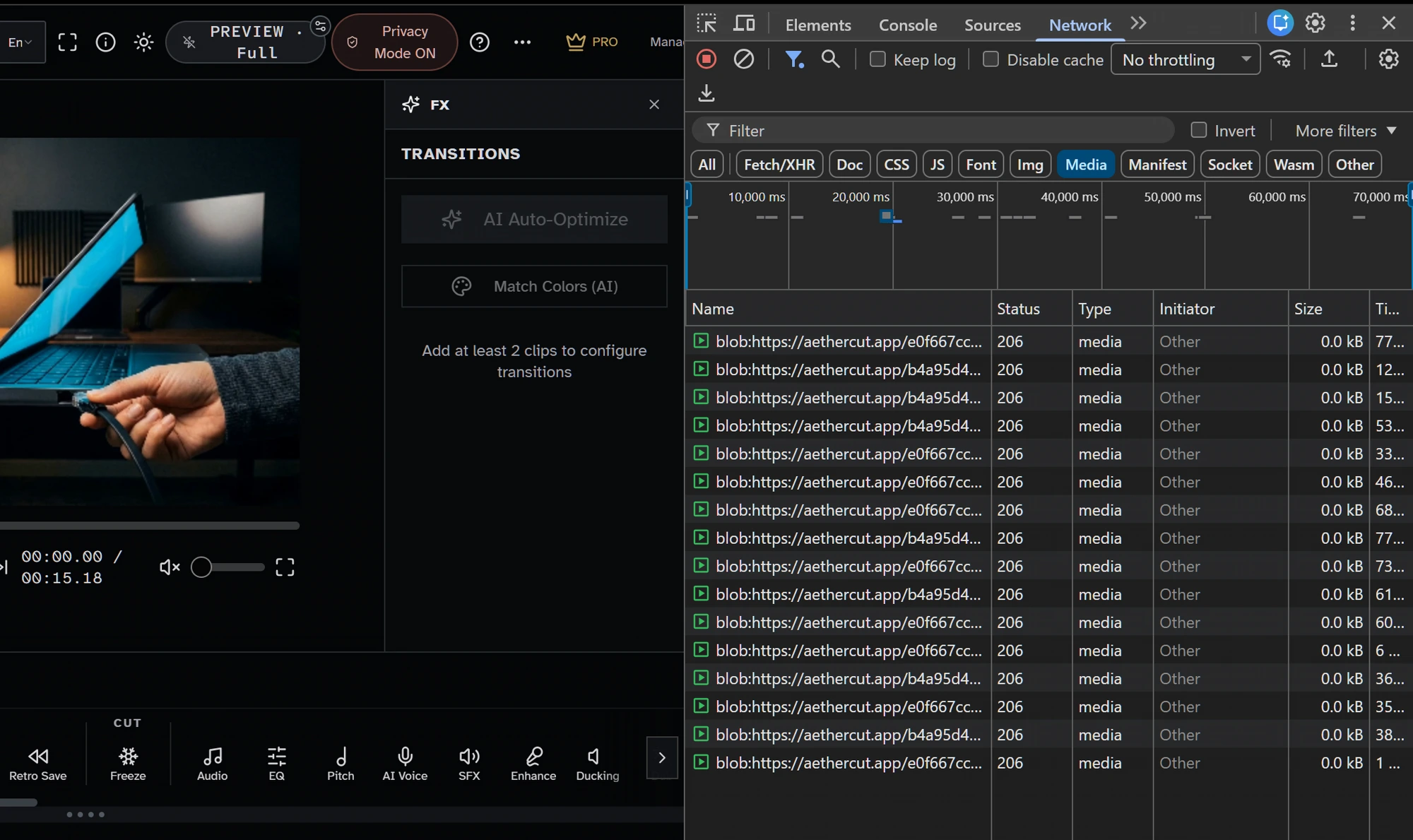
Privacy model
Clipchamp uploads your footage to Microsoft Azure. Microsoft's commercial data protection terms apply, which means your content is governed by the Microsoft Services Agreement and (for Microsoft 365 customers) the corresponding tenant data residency policies.
AetherCut keeps your footage in your browser's memory. No cloud account is created on your behalf. No license is granted to your content. Privacy Mode in the header lets you disable every optional cloud AI call with one click, leaving the editor fully offline-capable.
Pricing
Clipchamp has free + paid tiers. The free tier exports up to 1080p but applies feature gates on premium templates and stock library. Paid plans bundle Microsoft 365 OneDrive storage.
AetherCut's free tier exports 4K with no watermark. Pro is $14.95/month, $129.88/year (~$10.82/mo equiv), or a Lifetime Pro one-time purchase. No subscription required to access basic editing or export.
Local vs. cloud AI
Clipchamp's AI features (auto-captions, voice generation, background removal) run on Microsoft Azure. The processing pipeline is opaque to the user.
AetherCut runs background removal, scene detection, color match, and most other AI tools locally. Optional cloud AI is opt-in per feature and clearly labelled in the UI.
Offline + installable
Clipchamp requires an active internet connection — the render pipeline is server-side.
AetherCut is a PWA. Install once, use forever, even on a flight. The export runs in your browser via WebCodecs — your CPU/GPU do the work.
Which editor fits your workflow in practice?
The fastest way to choose between AetherCut and Clipchamp is to look at what happens the moment you drag footage into the timeline. In Clipchamp, import is the start of an upload-and-process workflow, so your editing experience depends on connection quality as much as device performance. In AetherCut, import is just your browser reading local files, which changes the kind of projects it suits best. If you regularly cut interviews, sales demos, training videos, testimonial reels, or rough assemblies from large camera files, local handling usually feels more predictable because nothing has to leave the machine before you can start trimming.
A common mistake is assuming "browser-based" always means "cloud-first." These two products happen to use the browser very differently. If you are comparing them for a team, test with a real project instead of a template-based demo: use a few long clips, disconnect Wi‑Fi midway, and see what still works. That simple test reveals the practical difference between a tool that depends on remote rendering and one that remains usable offline. It also helps surface another planning issue: if your organization has footage covered by client confidentiality, legal review, or internal security rules, the default upload path matters before anyone worries about transitions or stock assets.
If you want to evaluate AetherCut properly, start with a short project that mirrors your normal workload rather than an edge case. Import the source files you already have, make a few timeline edits, try one local AI tool, then export at your usual delivery resolution. That gives you a realistic read on responsiveness, export speed, and whether keeping everything on-device is simply a nice feature or the deciding factor.
Frequently asked questions
Why pick AetherCut over Clipchamp?
Privacy. AetherCut doesn't upload your media to anyone — not Microsoft, not us, not anyone. If your footage is sensitive (client work, NDAs, journalism source material, internal corporate content), this is the entire reason.
Does AetherCut work offline?
Yes. It's a Progressive Web App. Install it once, and the editor + export work with zero network connectivity. Optional cloud AI features will queue or skip until you're back online.
Try AetherCut now — no signup required.
Open the editor and verify the no-upload claim yourself in Chrome DevTools.
Free tier · Pro $14.95/mo · $129.88/yr · Lifetime Pro one-time
Sources
- WebCodecs (W3C Working Draft) W3C Accessed 2026-10-20
- Web Audio API MDN Web Docs (Mozilla) Accessed 2026-10-20
- File API MDN Web Docs (Mozilla) Accessed 2026-10-20
- Clipchamp pricing and plans Microsoft Accessed 2026-10-21
- Data Protection Addendum Microsoft Accessed 2026-10-21
Other comparisons + resources
Related searches
AetherCut answers for all of these search intents — pick the one closest to what you're looking for:
No signup. No upload. Verify privacy in DevTools in 30 seconds.
What editors say

“AetherCut is an absolute game-changer for video editors. The 100% local processing gives insane speed without worrying about cloud data leaks. Highly recommended! - Karan (Founder, Topkgamerz Media)”

“I was skeptical at first, looks a little generic on first impression and the pricing seemed low. This editor is genuinely unique and very capable. I'm glad I took the time to try it.”