AetherCut™ vs CapCut

A direct comparison of two browser-based video editors — one keeps every frame on your machine, the other ships your footage to ByteDance.
AetherCut is the better choice than CapCut when privacy matters, because it runs entirely in your browser and your footage never leaves your device, while CapCut uploads clips to ByteDance servers for processing. CapCut makes more sense if you specifically want its larger library of TikTok native templates and trend stickers.
If you're choosing between AetherCut and CapCut for your next video edit, the deciding factor isn't features — both editors cover the creator basics. It's where your footage lives while you edit, and who has access to it.
CapCut is a free, browser-based video editor owned by ByteDance, the parent company of TikTok. Every clip you import is uploaded to ByteDance servers for processing. AetherCut is a privacy-first video editor that runs entirely in your browser. Your footage never leaves your device — verifiable in Chrome DevTools.
Below is a feature-by-feature comparison plus an honest look at when each editor actually makes sense.
Six tools no other editor has
AetherCut ships six AI tools no other editor has. CapCut, Descript, Runway, and Adobe combined can't do these in one flow. Every one is included with the AI Layer ($9.99/mo) or Full Pro ($14.95/mo) — no credit meters, no add-on packs, no per-minute billing.
Prompt-to-Cut
Describe the edit in one sentence — get a finished timeline
Whisper transcribes every clip, Claude Sonnet plans the cut, AetherCut executes it on your timeline in 30-60 seconds. Nobody chains transcribe + reason + execute in one shot.
"Cut this 20-min interview into a 60-second highlight reel of the best insights" — finished edit.
Read more →AI Reshoot
Regenerate any bad take without reshooting
Highlight a clip you want to redo, describe what you want instead. Kling regenerates just that segment matching your aspect ratio, duration, lighting, and transcript context. Non-destructive insert or one-tap replace.
"Make her look at the camera not down at notes, keep the warm sunset light" — cinema-quality retake in 2-5 min.
Read more →Cross-Language Lipsync
Publish in every language — in your own voice, with lips matched
ElevenLabs Dubbing clones your voice and translates. fal.ai sync-1.7.1 resyncs the lip movement to match the new phonemes. First editor to bundle voice preservation with visual lip sync in one flow.
Record once in English, tap Spanish, publish for Latin America without hiring a translator or reshooting.
Read more →Ghost Draft
Paste text — get a finished video with b-roll and voiceover
The reverse of Prompt-to-Cut. Kling generates b-roll while ElevenLabs generates the voiceover in parallel, then both drop onto the timeline. Zero footage in, editable draft out.
Paste a blog paragraph or script (20-600 chars), pick a voice, hit Generate — video plus voiceover in 2-3 minutes.
Read more →AI Producer Notes
Claude reviews your edit and drops director-style critique
Metadata-only Claude call analyses clip pacing, transition variety, missing captions on speech, unused audio tracks, and structural balance. Returns 3-6 tagged notes with optional MM:SS timestamps.
"Pacing dips at 1:23," "Used cross-dissolve 7 times — vary it," "Lower third at 2:15 uses hard-to-read font."
Read more →Retroactive Highlight
Save moments before you knew they were moments
A continuous 60-second webcam plus mic buffer runs while you edit. Hit Ctrl+B or the Save button when magic happens and the last minute retroactively lands on your timeline as a new clip. OBS has replay buffer but only saves to disk with no editor integration.
Streaming, podcasting, or lecturing — realise 20s late "that was gold," hit Ctrl+B, moment saved.
Read more →Side-by-side comparison
| Feature | AetherCut | CapCut |
|---|---|---|
| Where your media lives | ✓ Stays in your browser | ✗ Uploaded to ByteDance servers |
| Verifiable in DevTools | ✓ Zero outbound media traffic | ✗ Visible uploads in Network tab |
| Free tier export resolution | ✓ 4K (3840×2160) | ✗ 1080p cap |
| Watermark on free tier | ✓ None, ever | Sometimes (varies by template) |
| AI captions (Whisper) | ✓ Runs locally via WebGPU | Cloud-only on ByteDance |
| Background removal | ✓ On-device ML | Cloud-only |
| Offline use | ✓ Full PWA, works on a flight | ✗ Internet required |
| Account required | ✓ Optional — try as guest | ✗ ByteDance account mandatory |
| Pricing | Free · $14.95/mo · $129.88/yr · Lifetime | Free · $7.99/mo · No lifetime |
| Export formats | ✓ MP4 · MOV · WebM | MP4 only on free tier |
| Training-data policy | ✓ No media collected = no training use | License granted via ToS |
| Real-time collaboration | ✓ Peer-to-peer (CRDT, no vendor server) | Cloud-mediated only |
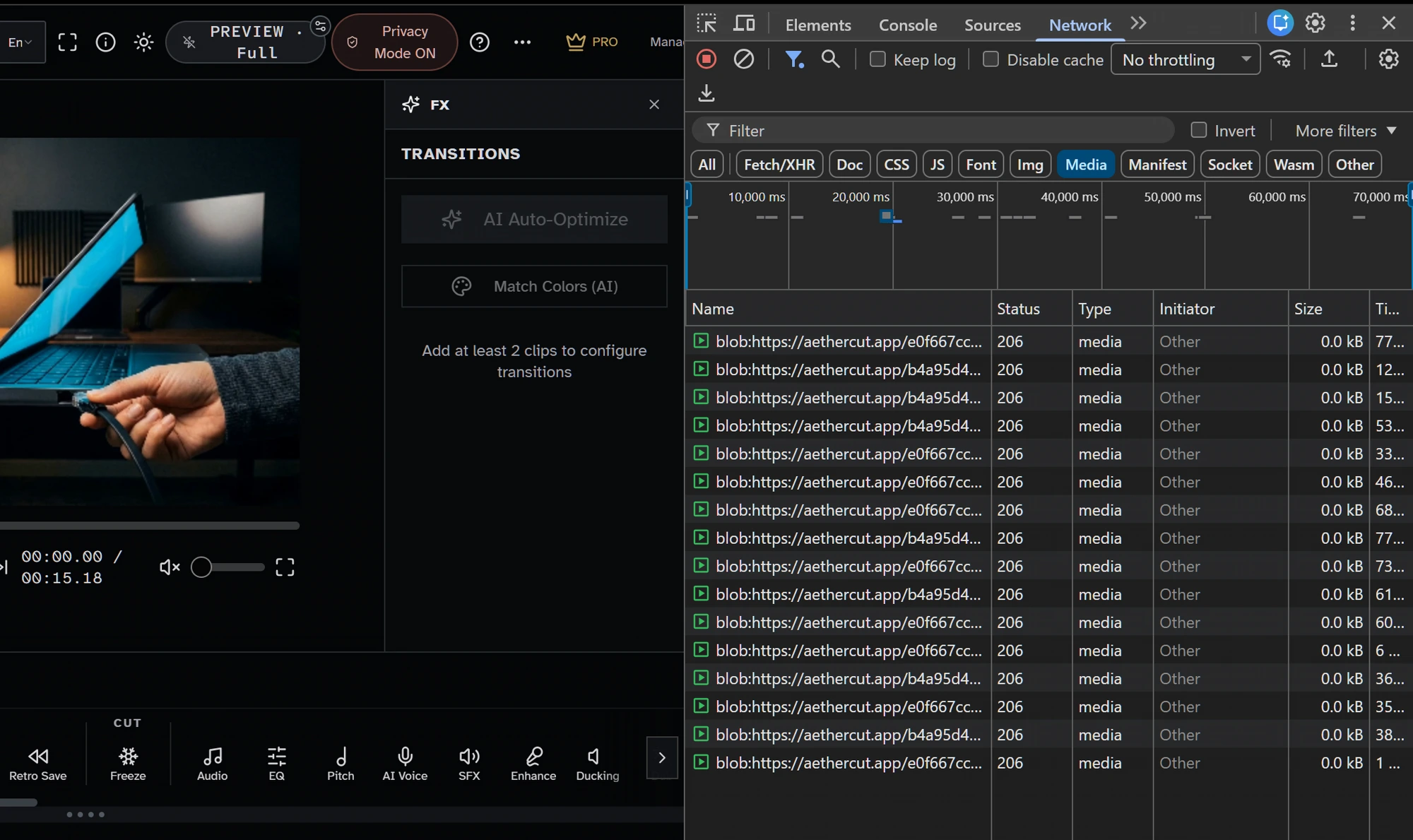
Where your footage lives during editing
When you import a clip into CapCut Web, the file is uploaded to ByteDance infrastructure. CapCut's terms of service grant them a license to process your content for service operation, and their privacy policy explicitly permits cross-border data transfers.
When you import a clip into AetherCut, the file is read into your browser's memory via the File API. No bytes leave your device. You can verify this claim yourself — open Chrome DevTools, open the Network tab, import a 4K video, and watch zero outbound traffic carrying media. This is the falsifiable privacy claim that no upload-based editor can make.
For creators handling client NDAs, medical case studies, legal discovery footage, journalism source material, or pre-release product reveals, this difference is the entire reason for choosing one tool over the other.
AI features — included vs. metered
Both editors bundle AI tools. The difference is how they handle your data and whether you pay per use.
CapCut's AI features (auto-captions, AI body effects, voice clone) run on ByteDance cloud infrastructure. Your audio and video are processed remotely. AI usage is technically free but the data flow is opaque.
AetherCut runs the majority of its AI features locally — background removal, color match, scene detection, motion tracking, video stabilization, and others use on-device ML. The AI features that genuinely require cloud inference (Whisper auto-captions, ElevenLabs voiceover, Kling B-roll generation) are bundled with Pro at a flat rate, not metered per second of audio or per generated clip.
Watermarks, exports, and resolution caps
CapCut Web exports up to 1080p on the free tier. Higher resolutions require their Pro subscription.
AetherCut exports up to 4K on every tier. No watermarks on any export, free or paid. The Pro tier unlocks longer timelines, more AI minutes, and Pro Quality preset — not basic export resolution.
Offline use
CapCut requires an internet connection to render — the export pipeline runs server-side.
AetherCut is a Progressive Web App (PWA). Install it once and the editor continues to work with zero network connectivity. Privacy Mode (a one-click toggle in the header) severs all optional cloud AI calls so the entire app runs offline.
When CapCut still makes sense
If you are exclusively editing footage you shot yourself, never under any NDA, and you actively want CapCut's TikTok-native templates and trend-stickers, CapCut's template library is larger today. AetherCut is a general-purpose editor with a privacy backbone, not a TikTok-content factory.
Everything else points to AetherCut: client work, sensitive footage, anything where uploading is a non-starter, or anyone who simply doesn't want their creative process feeding into ByteDance's training data.
Frequently asked questions
Is AetherCut really free?
Yes. The free tier includes the full editor, 4K export, no watermark, and most AI features. Pro adds longer projects, advanced AI features, and priority bandwidth for the cloud AI tools that need it.
Does CapCut upload my videos?
Yes. CapCut Web is a server-side editor — your clips are uploaded to ByteDance for processing. CapCut's privacy policy permits cross-border data transfers and they retain rights to operate on your content for service delivery.
How can I verify AetherCut doesn't upload my video?
Open AetherCut in Chrome. Open DevTools (F12). Switch to the Network tab. Import a video. You will see zero outbound traffic carrying media data. The claim is falsifiable in 30 seconds.
Try AetherCut now — no signup required.
Open the editor and verify the no-upload claim yourself in Chrome DevTools.
Free tier · Pro $14.95/mo · $129.88/yr · Lifetime Pro one-time
Sources
- WebCodecs (W3C Working Draft) W3C Accessed 2026-10-20
- Web Audio API MDN Web Docs (Mozilla) Accessed 2026-10-20
- File API MDN Web Docs (Mozilla) Accessed 2026-10-20
- CapCut - All-in-one video editor for video marketing CapCut Accessed 2026-10-21
- Privacy Policy CapCut Accessed 2026-10-21
- Terms of Service CapCut Accessed 2026-10-21
- Using files from web applications MDN Web Docs Accessed 2026-10-21
- Service Workers: an Introduction Google Developers Accessed 2026-10-21
Other comparisons + resources
Related searches
AetherCut answers for all of these search intents — pick the one closest to what you're looking for:
No signup. No upload. Verify privacy in DevTools in 30 seconds.
What editors say

“AetherCut is an absolute game-changer for video editors. The 100% local processing gives insane speed without worrying about cloud data leaks. Highly recommended! - Karan (Founder, Topkgamerz Media)”

“I was skeptical at first, looks a little generic on first impression and the pricing seemed low. This editor is genuinely unique and very capable. I'm glad I took the time to try it.”