The privacy video editor

A video editor where your media never leaves your device. Verifiable in Chrome DevTools.
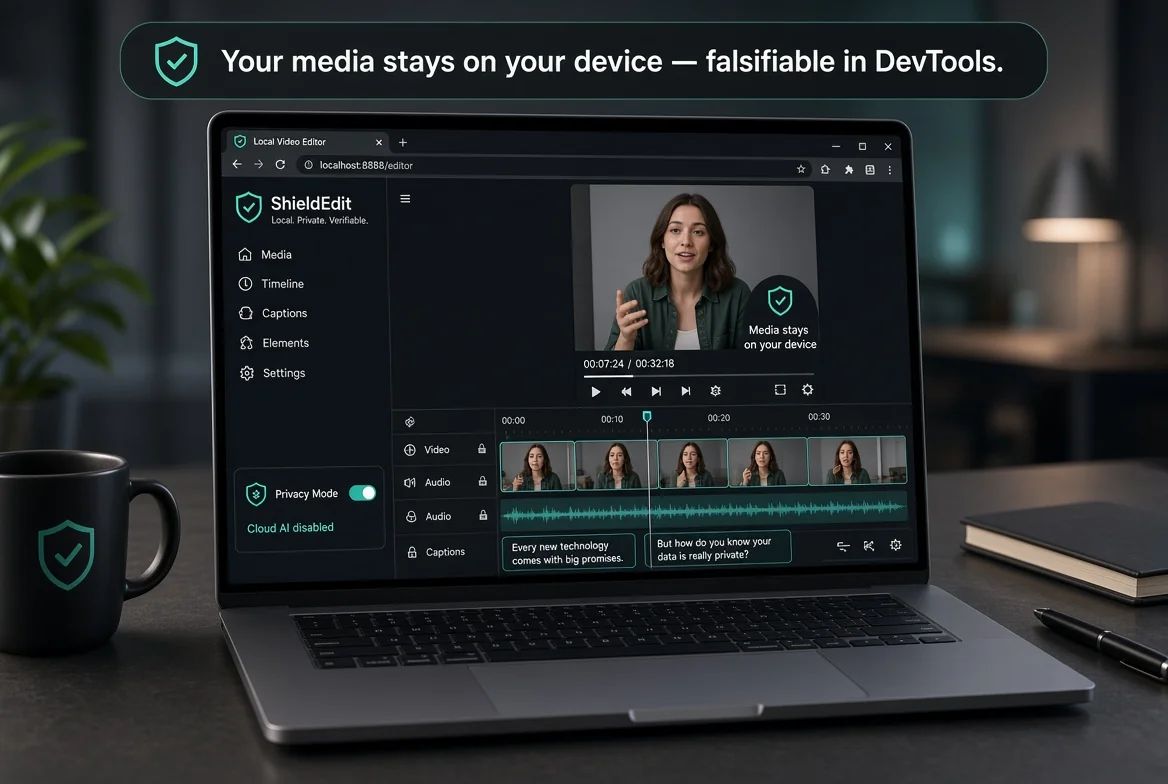
Every other browser-based video editor uploads your footage. AetherCut doesn't. The editor runs entirely in your browser via standard web APIs — File API, Canvas API, WebCodecs — none of which require network access. Your clips are read into your device's memory and never leave it.
This is the privacy video editor for creators who refuse the trade-off between modern AI editing features and data privacy. You get both: full timeline editing, AI-assisted captions, scene detection, color grading, motion tracking — running on your machine, with your footage staying on your machine.
What is a privacy video editor?
It means your media does not leave your device by default. AetherCut is built so uploading your files is impossible unless you choose optional cloud features, making privacy a structural part of the editor.
Most editors that market themselves as privacy-focused are upload-based editors with a privacy policy. The data still leaves your device; the company has just promised not to misuse it. You have to trust them.
AetherCut takes the opposite posture: trust isn't required. The architecture makes uploading your media impossible by default. Open DevTools and verify it yourself. The privacy claim is structural, not contractual.
What happens when Privacy Mode is on?
Privacy Mode turns off every cloud AI call with one click. AetherCut then works as a fully offline editor with no outbound network calls, while on device features like stabilization and scene detection still work.
AetherCut bundles cloud-based AI features (Whisper auto-captions, voiceover, B-roll generation) for users who want them. Each is opt-in and clearly labelled in the UI.
Privacy Mode is a one-click toggle in the header that severs every cloud AI call simultaneously. With Privacy Mode on, AetherCut becomes a fully offline editor — no outbound network calls of any kind, even for the optional AI features. The on-device AI features (background removal, color match, scene detection, motion tracking, video stabilization) continue to work normally.
Can I move AetherCut projects to another device?
Yes. Projects are stored in your browser and can be exported as a JSON file, then imported on another machine. Video exports use standard MP4, MOV, and WebM formats that work in other players and editors.
Your projects are stored in your browser's IndexedDB. You can export them to a JSON file at any time, and import them on a different machine. There's no proprietary cloud project format you'd lose access to if AetherCut went away tomorrow.
Exports are standard MP4 / MOV / WebM — playable in any video player, editable in any other editor.
Pricing — no privacy paywall
Privacy isn't a Pro feature. The free tier ships with full 4K export, no watermarks, and most AI tools. Privacy Mode is available on every tier.
Pro adds longer projects, advanced AI features, and the Lifetime Pro one-time purchase eliminates subscription entirely.
How to verify your footage stays local
If you want a practical check instead of a promise, AetherCut makes that easy. Turn on Privacy Mode, open your browser’s DevTools, and watch the Network panel while you import clips, scrub the timeline, add cuts, generate scene detection, or export a file. You should see the editor working without media uploads because those actions rely on local browser capabilities rather than a remote render queue. This is a useful test for teams with client footage, unreleased campaigns, legal interviews, or internal training videos where “we don’t store your files” is not the same as “your files never left the laptop.”
A common mistake is assuming every AI-looking feature must be cloud-backed. In AetherCut, some features are optional cloud services and some run on device, so the safest habit is to decide your privacy requirement first, then edit accordingly. If a project cannot leave the machine under any circumstances, enable Privacy Mode before importing media and keep it on for the full session. That removes ambiguity and prevents accidentally reaching for a cloud-only tool halfway through an edit.
Another useful workflow is to separate private editing from portable handoff. Cut and review locally, then export either the finished video or the project JSON only when you actually need to move work to another machine. That keeps the raw footage confined to the device where it started while still giving you a clean way to continue the project elsewhere. For privacy-sensitive creators, that distinction matters more than any line in a policy document.
Frequently asked questions
Does AetherCut have a privacy policy?
Yes, but the most important thing about it is that there's very little to write down — we don't collect your media because the media doesn't reach us. The privacy policy covers the analytics signals we do collect (anonymous page views, export metric ratios) and how to opt out.
Can I use AetherCut without an account?
Yes. The 'Try without signing in' button on the landing page drops you straight into the editor as a guest. No account, no email, no cookie that persists past your session.
Does AetherCut work offline?
Yes. It's a Progressive Web App. Install it once and the entire editor works without internet — including export. Optional cloud AI features will skip or queue when you're offline.
Try AetherCut now — no signup required.
Open the editor and verify the no-upload claim yourself in Chrome DevTools.
Free tier · Pro $14.95/mo · $129.88/yr · Lifetime Pro one-time
Sources
- WebCodecs (W3C Working Draft) W3C Accessed 2026-10-20
- Web Audio API MDN Web Docs (Mozilla) Accessed 2026-10-20
- File API MDN Web Docs (Mozilla) Accessed 2026-10-20
- File API W3C Accessed 2026-10-21
- HTML Living Standard WHATWG Accessed 2026-10-21
- Indexed Database API 3.0 W3C Accessed 2026-10-21
- Service Workers: an Introduction Google Chrome Developers Accessed 2026-10-21
- Media formats supported by the HTML audio and video elements MDN Web Docs Accessed 2026-10-21
Other comparisons + resources
Related searches
AetherCut answers for all of these search intents — pick the one closest to what you're looking for:
No signup. No upload. Verify privacy in DevTools in 30 seconds.