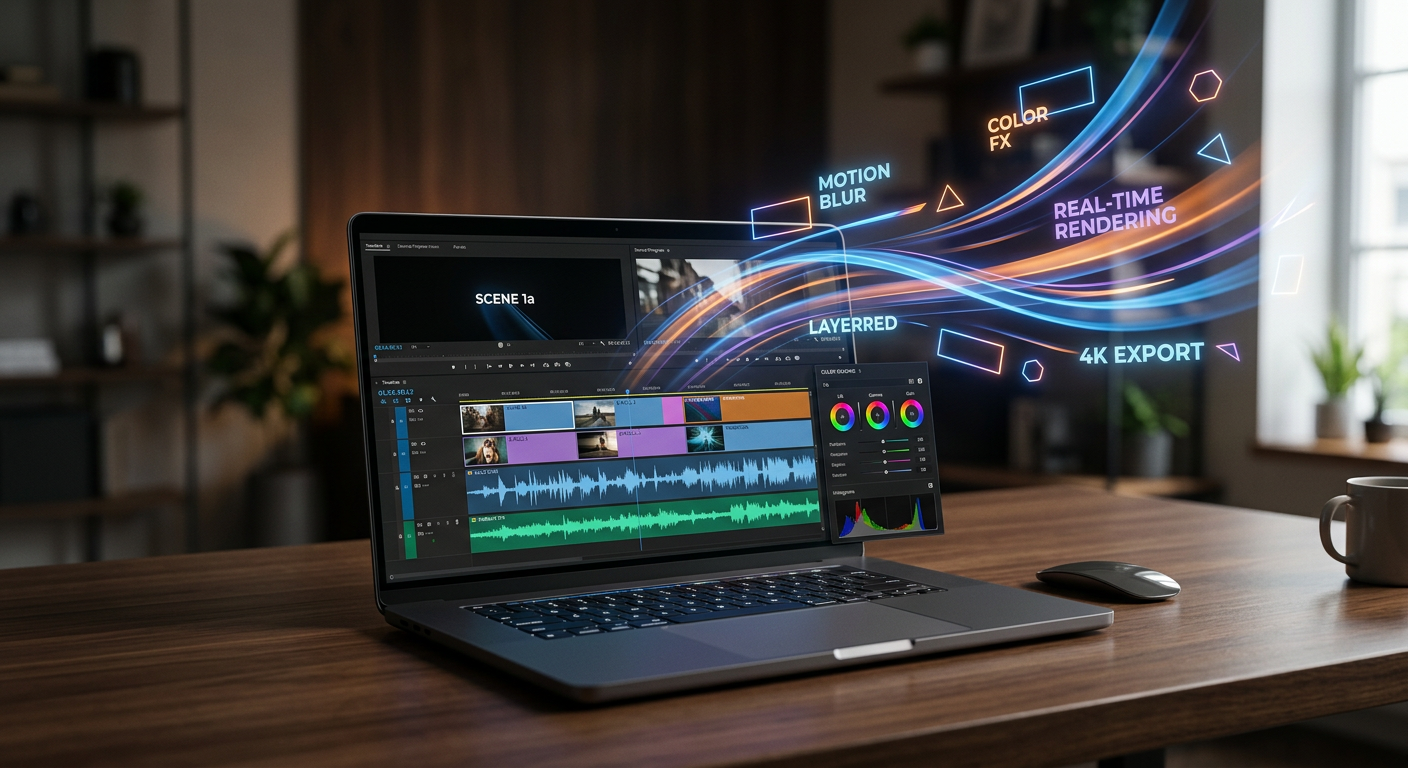
You can edit video online with effects for free by opening the file in a browser-based editor that renders client-side: add transitions, filters, text, and captions on a multi-track timeline, then export without a watermark. Your footage never leaves your machine, which you can verify in DevTools. This guide walks through each step, plus which effects fit tutorials, talking heads, product demos, and social clips.
A browser editor gives you six effect categories: transitions between clips, filters and color adjustments, text and titles, auto-captions, speed changes, and audio effects like fade or ducking. The constraint that matters for regulated work is where these render. AetherCut processes everything client-side through the File System Access API, so your footage is read from disk without leaving your machine (MDN, File System Access API).
The whole workflow takes four steps: open the editor in a tab, import footage from your local drive, cut and add effects on a timeline, then export. No install, no account, and nothing leaves your machine.
Open your project on a multi-track timeline and drop two clips onto track one, back to back. Click the seam between them and choose Crossfade, then drag the transition handle to set its length, usually 0.5 to 1 second for talking-head footage. The preview plays the blend in real time; nothing is queued or rendered remotely.
Applying a filter to a clip Select the first clip, open the Filters panel, and pick a look. Drag the intensity slider until skin tones and document text stay legible, then right-click and apply the filter to all clips if you want a consistent grade. Every adjustment is stored as a parameter on the clip, not baked into pixels, so you can change it later.
Placing text on a second track Drag a title block onto track two, position it over the lower third, and type your text. Because it sits on its own track, the title stays editable and independent of the cuts below it. Reposition it by dragging in the preview, and trim its duration by dragging the block's edges.
Generating captions with Whisper Click Captions, choose Whisper, and let it transcribe locally. Decoding and encoding happen on your machine through WebCodecs, the browser API for programmatic media processing (MDN Web Docs), so confidential footage never crosses the network. Fix any misheard terms in the caption editor, style the text once, and you have a finished edit. Start without signing up at AetherCut's free editor.
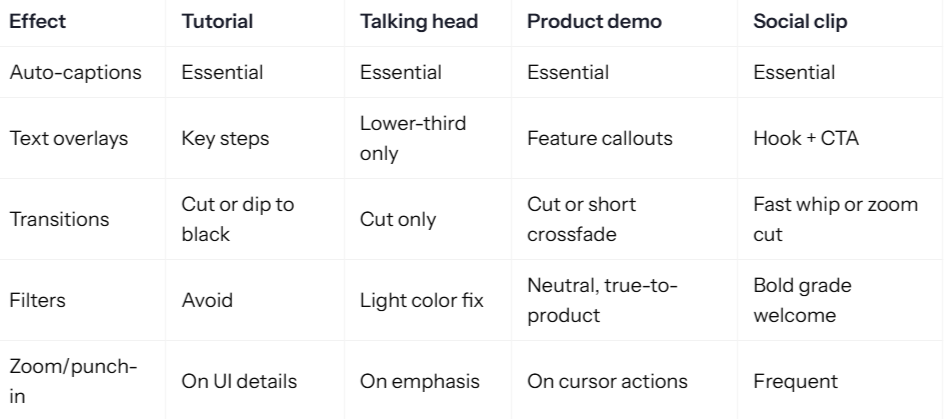
Effects earn their place when they reduce cognitive load. They cost you viewers when they compete with the content. The matrix below is a starting point, not a rulebook.
Tutorials Viewers follow your screen, so captions and step labels do the work. Zoom into the exact UI element you are describing. Skip filters entirely; they blur interface text.
Talking heads A single lower-third and a clean cut between takes. Every wipe or flash signals "edited" and erodes authority, which matters if you are a lawyer or clinician on camera. For footage with confidentiality constraints, see editing confidential footage in the browser.
Product demos Keep colors accurate so the product looks like the product. Crossfades under half a second and punch-ins on cursor movement guide attention without theatrics.
Social clips This is the one place heavy effects pay. Fast cuts, bold grades, and on-screen hooks match platform pacing. Honest limitation: heavy 4K effect stacks push browser rendering hardest, so test export times before committing to a style.
The whole pipeline runs on your machine: your browser reads the file from disk, decodes frames, applies effects on the GPU, and encodes the export. No frame ever crosses the network. Here is each layer.
Local file access and decoding The File System Access API lets the editor open your source clip directly from disk and read it as buffers, without a copy landing on any remote server. WebCodecs then decodes those frames to raw video in the browser, so a 4K source file is handled the same way a desktop editor would handle it.
GPU-accelerated effects Filters, LUTs, transitions, and text compositing run as shader work on your graphics card through WebGPU, the web API designed for exactly this kind of parallel pixel processing (see MDN's WebGPU documentation). Because the work happens on the GPU rather than in JavaScript, preview scrubbing with multiple effects stacked stays responsive.
Verify it yourself in the Network tab Open DevTools, load a project, scrub the timeline, and export. Filter the Network tab to media requests: you will see zero outbound video bytes. That is the test CapCut, Descript, Clipchamp, Kapwing, and VEED.io cannot pass, because their processing depends on shared remote state. We walk through the same verification in more depth on our offline browser video editor page.
Where client-side editing falls short Real-time collaboration needs shared state, and shared state needs a server, so browser-local editing cannot offer live multi-user sessions. Very large projects can also hit browser memory limits, and WebGPU support requires a recent browser version. If a teammate in another city needs to cut the same timeline simultaneously, a desktop editor with a shared project file is still the better fit.
Stacked transitions are the fastest way to lose a viewer. A crossfade between every clip reads as amateur, and a 2-second wipe adds dead time to each cut. Pick one transition type, use it at scene changes only, and keep it under half a second.
Heavy filters compound the problem. A color grade layered over a vignette over a blur crushes detail, and on talking-head footage it hides the facial cues your audience relies on. If a filter exists to hide bad lighting, fix the lighting instead.
Caption styling hurts when it obscures: translucent boxes over faces, text larger than a third of the frame, or captions that sit on the lower third where UI chrome covers them on mobile.
Cut effects entirely when the edit is informational. A deposition clip, a training walkthrough, or a source-protected interview needs hard cuts and accurate captions. Every effect you add is a claim that this moment matters; use it only when it does.
Export settings depend on your delivery target. For 1080p talking-head and tutorial work, H.264 at 8–12 Mbps with AAC audio is the safe default; for 4K source footage, expect longer render times because every transition and filter is composited frame by frame in the browser via WebCodecs and WebGPU.
Free tiers in this category usually cap you three ways: a watermark burned into the corner, a resolution ceiling, or export quotas. AetherCut applies no watermark on any tier, so the free path is the full path. If you burned in auto-captions, those render as part of the video track, not as an overlay that gets stripped on export.
Caption accuracy matters for legal and medical footage, so check transcripts before exporting. Whisper, OpenAI's open-source speech recognition model, is the common engine behind browser caption tools, and its documentation covers known limitations with accents and technical vocabulary (Whisper documentation).
Run every option through three checks: does footage leave your machine, is there a watermark, and can you cut a multi-track timeline.
CapCut, Descript, Clipchamp, Kapwing, and VEED all process footage on their infrastructure, which is disqualifying if you handle deposition video, patient material, or source-protected interviews. None of them can sign around that, because their collaboration and AI features depend on shared servers.
AetherCut keeps every byte client-side. Open DevTools, watch the Network tab while you edit and export, and you will see no outbound video traffic. There is no watermark on any tier and the timeline supports multiple video tracks.
Where it falls short: the browser runtime caps performance on long 4K timelines compared with a desktop NLE, effects libraries are narrower than CapCut's, and collaboration is absent because real-time shared state requires a server. If you need teammates in the same project simultaneously, no privacy-first browser editor will satisfy you today. For solo edits of confidential footage, the trade is straightforward.
Can I edit a video online with effects for free without a watermark? Yes. AetherCut's free tier exports without a watermark, with no resolution ceiling or export quota. You get the full effect set: transitions, filters, text, Whisper captions, speed changes, and audio fades. Most free editors cap you three ways instead, burning a watermark into the corner, capping resolution, or limiting how many exports you can run.
Do online video editors upload my footage to their servers? Most do. CapCut, Descript, Clipchamp, Kapwing, and VEED all process footage on their infrastructure, which their collaboration and AI features depend on. AetherCut reads files from disk through the File System Access API and renders client-side, so no frame crosses the network. You can confirm this yourself: open DevTools, filter the Network tab to media requests, and watch for zero outbound video bytes.
Can I add effects to a video in my browser without installing anything? Yes. Open the editor in a tab, import footage from your local drive, and work on a multi-track timeline. Transitions, filters, titles, and auto-captions all apply without an install or an account. Decoding and encoding run through WebCodecs and WebGPU on your own machine, so a 4K clip loads instantly and exports in minutes.
What effects should I use for a talking head video? Keep it minimal: a single lower-third, hard cuts between takes, and a light color fix if the footage needs it. Zoom in only for emphasis, and skip wipes or flashes entirely, since they read as amateur and erode authority on camera. Captions are essential for accessibility and silent viewing, but style them so they never cover faces.
Can I edit video with effects offline in the browser? Yes, once the editor is loaded in a tab. Because file access, decoding, effects rendering, and export all happen locally through the File System Access API, WebCodecs, and WebGPU, an internet connection is only needed to open the page. The limitations are browser memory on very large projects, WebGPU requiring a recent browser, and no real-time collaboration.