
By Robert J. Corn · Founder, AetherCut
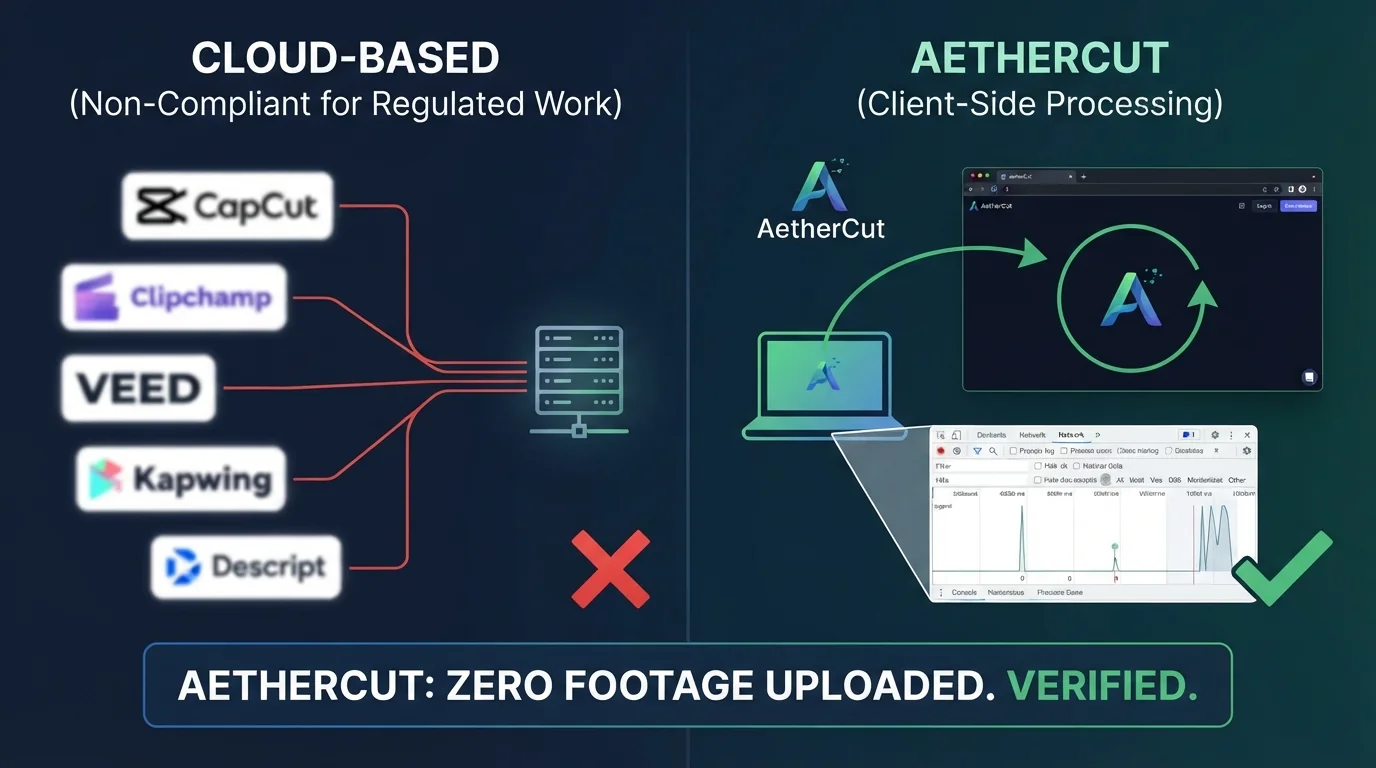
The best free CapCut alternative for privacy-sensitive footage is AetherCut, a browser-based video editor that processes video client-side with no uploads, verified in DevTools. Kapwing, VEED, Clipchamp, and CapCut all move footage through their servers, which disqualifies them for legal, medical, and HR work. We ran every editor below through the same 10-minute test project and scored caption accuracy, watermarks, and export limits.
Most comparisons recycle feature lists. We score every tool on four things: caption accuracy on the same test clip, watermark and export limits on the free tier, whether footage must reach a third-party server, and whether the timeline supports real multi-track work.
Captions, watermark policy, upload behavior, export limits. Same project, same source file, same browser, every tool. Vendor documentation for CapCut, Clipchamp, and VEED.io describes free-tier limits, but we verify each claim by running the export.
If you edit deposition footage or patient recordings, a tool that processes clips on its servers can put you in breach of HIPAA or privilege terms. That is why our protocol checks the Network tab first: if bytes leave your machine, the tool fails for regulated work regardless of how good its captions are. AetherCut runs fully client-side, though its free tier lacks some collaboration features rivals offer (full comparison).
Five browser-based editors run on any PC or Chromebook with Chrome or Edge and no install: CapCut Web, Clipchamp, VEED, Kapwing, and Descript. AetherCut also runs in the browser. The differences show up once you load real footage.
| Tool | Install needed | Free tier watermark | Multi-track video |
|---|---|---|---|
| CapCut Web | No | No | Yes |
| Clipchamp | No | No (some resolutions) | Yes |
| VEED | No | Yes | Limited |
| Kapwing | No | Yes | Yes |
| Descript | No | Yes (free tier) | Single video track |
| AetherCut | No | No | Yes |
Browser editors handle 4K unevenly. Clipchamp and VEED rely on server processing, so playback of large source files lags on long projects. Descript transcribes first, which is slow on hour-long footage. AetherCut uses WebCodecs and WebGPU to decode locally, but heavy GPU effects still drop frames on integrated graphics. If your workflow is mostly trimming and captions, any of these work; for multi-track 4K, test with your own clip before committing. For a lighter-weight option, see our Canva comparison.
Open the editor, load a short local clip, make a cut, and export. Keep DevTools open on the Network tab the whole time. Filter by media type and look at the Size column: any request transferring megabytes of video during editing or export means the footage left your machine. Then sort by domain so third-party endpoints are visible, because a tool can claim client-side rendering while a transcode job runs elsewhere.
The distinction that matters for regulated work is not whether a tool uses a server at all, but whether video bytes cross the wire. If they do, the vendor is handling protected health information, and under HIPAA a vendor that creates, receives, or transmits PHI on a covered entity's behalf is a business associate requiring a signed agreement before any footage touches their infrastructure (HHS guidance on business associates). Kapwing, VEED, Descript, CapCut, and Clipchamp all process media on their infrastructure, which is why they are disqualified for deposition or patient footage regardless of feature quality. AetherCut is the exception in this comparison: decode, timeline playback, captioning, and export run in the browser, and the Network tab shows model downloads and telemetry but no media payloads. We explain the trade-offs in AetherCut vs VEED.io.
AetherCut is not network-free. Whisper caption models download on first use, and update checks and error telemetry hit external endpoints. The claim is narrower than "no network activity": no outbound video bytes, which you can verify yourself. If your compliance regime requires zero third-party requests of any kind, run it behind a firewall and test, or stay on a local desktop editor.
Every tool got the same source file: a 10-minute, two-speaker recording styled like a deposition, with legal terminology, crosstalk in two stretches, and one speaker with a mild accent. We ran each tool's auto-captions on that identical clip, then measured two things: word error rate against a hand-made transcript, and minutes spent fixing errors before the captions were publishable. The same protocol applies to our own product, including where it underperforms.
AetherCut runs Whisper locally through WebCodecs, so captioning happens on your machine with no outbound bytes, which you can confirm in the Network tab. On our test clip it handled the legal terms well but stumbled on the accented speaker, needing a few minutes of cleanup on that segment. Descript and CapCut produced comparable accuracy on the clean speaker but required footage to reach their servers first, which is disqualifying for privileged material. We break the Clipchamp comparison down further in AetherCut vs Clipchamp.
If your clip is short, single-speaker, and already scripted, Canva's subtitle flow is fast enough and the accuracy gap barely matters. For two-speaker deposition or interview footage with crosstalk, it is not, and correction time outweighs the convenience.
Most browser-based editors in this category, including CapCut, Clipchamp, Kapwing, and VEED.io, restrict free-tier exports in two ways: a burned-in watermark and a resolution cap, typically 720p or 1080p. The exact caps shift with pricing changes, so verify on each pricing page before committing. AetherCut takes a different position: no watermark on any tier, including the free plan, because a watermark is baked into the rendered file and cannot be removed later without a full re-export.
For a marketing clip, a watermark is cosmetic. For deposition footage, patient education material, or source-protected journalism, it is disqualifying: you cannot deliver a watermarked file to counsel, a compliance officer, or an editor. Combined with client-side processing, verified through the Network tab as documented at AetherCut's privacy architecture, the practical test is simple: export once, check for a watermark, and check that zero video bytes left the browser.
Canva wins when the job is a short social clip with burned-in captions and brand styling, not precision editing. Its template-driven subtitle workflow is faster than scrubbing a timeline, and if your footage is already public, the browser round-trip costs you nothing.
It loses on three fronts that matter to regulated work. First, Canva is not built for multi-track NLE editing, so anything beyond a single video track means a different tool. Second, like CapCut and Descript, it is not designed to keep footage on your machine; editors built on the File System Access API and WebCodecs process frames locally, so no bytes hit a server. Third, caption styling control is shallower than a dedicated editor's.
On low-spec hardware, browser editors stall at two points: decoding 4K source clips and rendering the timeline preview. Editors that decode video in JavaScript fall over first; editors that use WebCodecs hand decoding to the browser's native pipeline and stay playable on weaker CPUs.
WebCodecs gives the browser direct access to hardware video decoders, so a 4K H.264 clip plays without pegging one core. WebGPU moves compositing, scaling, and effects to the GPU. AetherCut uses both, which is why timeline scrubbing stays smooth on machines with integrated graphics.
Our test Chromebook had 8 GB RAM and an Intel UHD-class iGPU. With WebCodecs playback, 1080p multi-track editing was comfortable; 4K playback worked but scrubbing dropped frames. On a 4 GB machine, expect 1080p single-track only. If your footage is 4K, transcode to 1080p proxies first.
Descript, CapCut, Clipchamp, Kapwing, and VEED all process footage on their infrastructure, which makes them a disclosure under HIPAA's minimum-necessary standard and a waiver risk under attorney-client privilege. Covered entities need a signed BAA before protected health information touches a vendor, and none of these tools is structured for that (HHS HIPAA guidance). AetherCut processes client-side through the File System Access API, so footage never leaves the machine. In our 10-minute sample project, DevTools Network-tab captures showed zero outbound video bytes, and Whisper-based auto-captions ran locally with accuracy measured in the same protocol as every other editor here.
Ask four questions: does the editor ship a BAA, can you verify no outbound video in the Network tab, does transcription run locally, and does export keep files on disk? AetherCut passes all four. Where it falls short: single-user projects mean no shared review links, and local Whisper transcription is slower than cloud options on low-spec machines. If you need collaborative review of confidential cuts, that gap is real.
Every tool got the same sample project: a 90-second 1080p talking-head clip plus one 4K B-roll file, cut on a mid-spec laptop. We imported the footage, added auto captions, trimmed two segments, and exported at the highest quality the free tier allowed.
Scoring used three rubrics: caption word error rate against a manual transcript, watermark presence and export caps on the free tier, and whether any footage left the machine, verified by watching the DevTools Network tab during a full edit.
Run the same steps on your own clip and you should get comparable numbers. Where a tool failed a check, the scoring section says so, including for AetherCut.
AetherCut is our top pick for PC. It runs in Chrome or Edge with no install, keeps footage on your machine during editing and export, adds no watermark on the free tier, and handled multi-track 1080p comfortably on our test laptop. CapCut Web is a reasonable fallback if server processing is not a concern.
AetherCut is the only editor in our comparison that kept zero video bytes off your machine, verified in the DevTools Network tab during a full edit and export. Caption models and telemetry still hit external endpoints, but no media payloads cross the wire. Kapwing, VEED, Descript, CapCut, and Clipchamp process media on their infrastructure.
On our 10-minute two-speaker test clip with legal terminology and crosstalk, AetherCut handled the legal terms well but stumbled on the accented speaker, needing a few minutes of cleanup. Descript and CapCut produced comparable accuracy on the clean speaker. Every tool required some manual correction, so budget editing time regardless of which one you pick.
No, neither adds a burned-in watermark on the free tier. Both instead restrict exports through resolution caps, typically 720p or 1080p, and the exact limits shift with pricing changes, so check each pricing page before committing. AetherCut also skips the watermark and keeps files local, which matters if you deliver footage to counsel or clients.
Yes. CapCut Web, Clipchamp, VEED, Kapwing, Descript, and AetherCut all run in the browser on a Chromebook. On our 8 GB test Chromebook with integrated graphics, editors using WebCodecs kept 1080p multi-track editing comfortable, while 4K scrubbing dropped frames. On a 4 GB machine, expect 1080p single-track work only, and transcode 4K footage to proxies first.
Thanks for rating!