
By Robert J. Corn · Founder, AetherCut
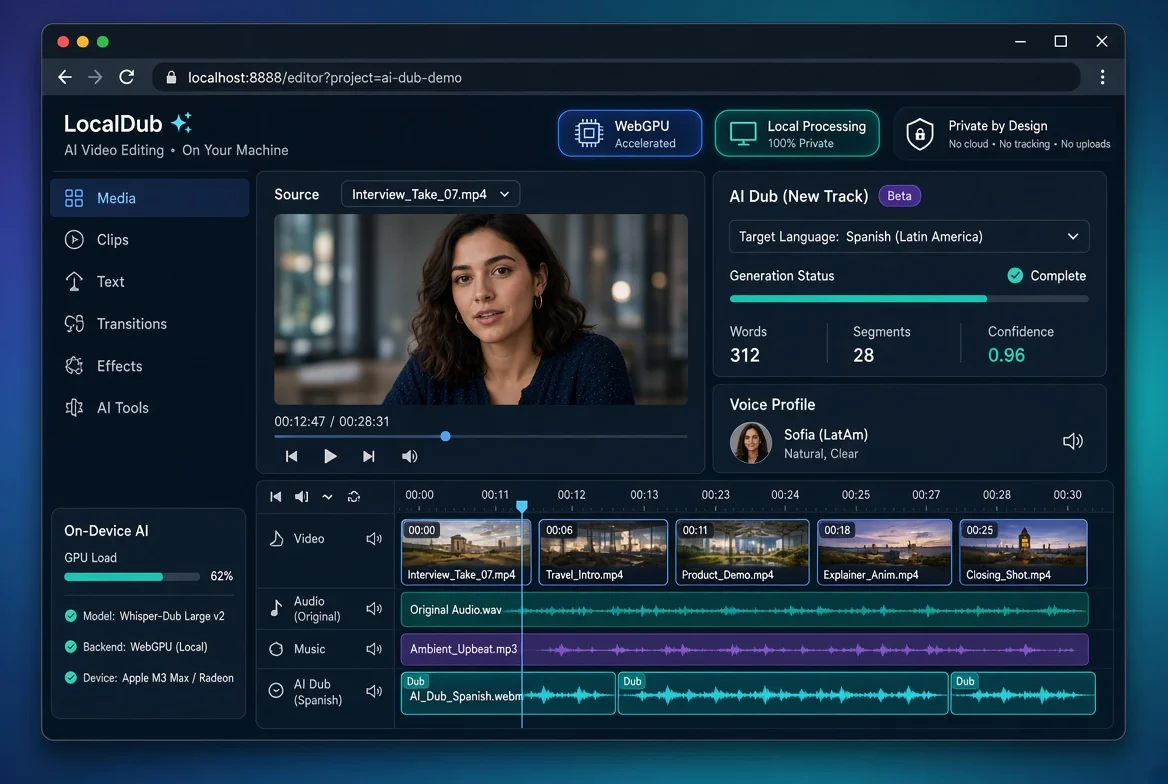
You can dub long videos with a free ai dubbing free video translator entirely in your browser, without sending a single byte of footage to a server, by using tools that process client-side through [1]. This guide documents free-tier limits across the tools you'll actually land on, and shows a DevTools Network-tab workflow that proves zero outbound video bytes before you touch regulated footage.
Free tiers on browser-based dubbing tools are rarely free in the way a regulated professional needs. The tools in this category, including Descript[2], CapCut, Clipchamp, Kapwing, and VEED.io[3], each publish their own free-tier terms, and the details matter more than the headline price.
Most tools meter dubbing in transcription or generation minutes per month, cap export resolution, and stamp a watermark on the free tier. Voice cloning is typically gated behind paid plans. Check each vendor's own documentation before committing footage, because the caps change often.
The second catch is quieter: most of these tools process your media on their servers, which is disqualifying if your footage carries HIPAA or privilege constraints. A workflow that keeps everything client-side, like AetherCut's free video editor with no account, sidesteps that exposure entirely.
Short answer: none of the mainstream browser editors let you dub a long video free with no watermark. CapCut, Descript[2], Clipchamp, Kapwing, and VEED.io[3] all gate either export length, watermark removal, or dubbing itself behind paid plans. Free tiers are trial funnels, not working tools.
The exact numbers vary by plan and change often, so verify against each vendor's pricing page before committing. The pattern holds, though:
| Tool | Free dubbing | Long video free | Watermark on free |
|---|---|---|---|
| CapCut | Limited credits | Short clips | Yes, on some exports |
| Descript | Trial only | Very short | Yes |
| Clipchamp | Not offered | Short | Yes, on some exports |
| Kapwing | Trial minutes | Short | Yes |
| VEED.io | Trial minutes | Short | Yes |
| AetherCut | Yes, local Whisper | Full length | No, any tier |
Two structural problems repeat across the category: free dubbing is metered in credits or minutes, and watermark removal is the paid upgrade. AetherCut takes a different route by running transcription and translation locally in your browser, so there is no per-minute meter to hit and no watermark on any export. The trade-off: local processing is slower on older hardware than a datacenter render, and language coverage is narrower than the biggest vendors' catalogs.
Open the editor, load a real clip, and watch the Network tab for a full minute of scrubbing and playback. Any request body or blob transfer to an external domain means your footage is leaving the machine, whatever the marketing page says. HIPAA treats vendors that handle protected health information as business associates with formal obligations, so a tool with no outbound video traffic sidesteps that contract entirely (HHS Business Associate guidance).
The long paragraph: The reason this works in a browser at all is that modern APIs moved the heavy lifting onto your hardware. WebCodecs decodes your source clip frame by frame without a round trip, WebGPU runs transcription and translation models locally, and the File System Access API lets the editor read your original file in place, so the bytes never move. In AetherCut you open the file, let the local Whisper pass generate a transcript, pick the target language, and the translated track drops onto the multi-track timeline as a normal audio layer you can trim and mix like any other. Export runs through the same local pipeline, so a 4K file with a dubbed track renders on your GPU rather than on someone else's queue. If you want to see how this no-upload approach compares with the tools that do ship footage to their servers, the breakdown at the six-tools comparison documents the differences tool by tool.
For clean speech in a quiet recording, AI dubbing gets the meaning across reliably. Human dubbing still wins on nuance: tone, comedic timing, and emotional delivery that a synthetic voice flattens. Treat AI output as a strong first pass that a fluent speaker reviews before anything client-facing.
Three categories fail most often. Proper nouns get mangled, since the model guesses at pronunciation it has never heard. Numbers and dates shift or drop, which is unacceptable in deposition or clinical footage. Legal and medical terms get translated literally instead of idiomatically.
Practical workflow: dub locally in a browser tool like AetherCut, then have a native speaker check every name, figure, and term of art against the transcript. Budget roughly one review pass per ten minutes of footage. If your content is dense with case citations or drug dosages, that review step is not optional.
Voice cloning on a free tier is rare, and the trade is usually your voice data. Descript, CapCut, and VEED[3] all advertise cloning, but free tiers typically restrict clone counts, minutes, or export quality, and cloning means sending reference audio to their servers. For deposition or patient footage, that is the problem: a cloned voice is biometric data, and handing it to a third-party processor raises the same privilege and NDA questions as handing over the footage itself, as guidance from the American Bar Association on sharing privileged material with outside vendors makes clear.
AetherCut runs Whisper transcription and synthesis client-side, so no audio leaves the tab, and you can watch the Network tab to confirm it. The honest limit: free-tier voice cloning quality trails paid vendors, and multi-track dubbing is tighter than what web-native freelancing workflows demand.
Free tiers constrain exports in three places: clip length, output resolution, and language coverage. Length caps on free plans across browser-based editors typically run from a few minutes to roughly ten, enough for social clips but not a deposition or a lecture. Resolution is the second gate: 720p exports are common on free plans, with 4K export gated behind payment. Language coverage varies more than either, since dubbing quality per language, not the raw count, is what determines whether the output is usable.
Treat published limits as a floor, not a ceiling. Free plans can also throttle processing speed, restrict voice cloning to a trial, and stamp a watermark on export, so the advertised length cap is rarely the only constraint you hit.
AetherCut publishes no export caps on length, resolution, or languages because processing runs client-side through WebCodecs: your hardware, your limits. A 4K export takes as long as your GPU needs, and there is no watermark on any tier. The honest trade-off is that a weak machine is a weak machine; a five-year-old laptop will export 4K slowly, and no browser tool can fix that.
If footage carries HIPAA obligations, attorney-client privilege, or NDA terms, any free dubbing tier that moves clips to a vendor's servers is off the table. The free plan's length limits and watermark are irrelevant; the upload itself is the violation. That rules out browser tools like Kapwing, VEED[3], and CapCut for deposition video, patient footage, and source-protected interviews unless you can verify the data path yourself.
Verification beats policy. Open DevTools, select the Network tab, load your footage, and watch for outbound requests containing media bytes. A client-side editor built on the WebCodecs API and the File System Access API can decode, dub, and export 4K locally, so the tab stays quiet. If you see video bytes leaving the browser, the tool fails regardless of what its privacy page claims. Free tier or paid tier does not change the test.
Upgrade on volume when free length caps force you to split one recording into pieces and stitch the dubbed audio back together. If you dub more than a few long videos a month, the editing overhead costs more than a subscription.
Upgrade on quality when machine voices in the target language still fail review, or when you need consistent voice cloning across a series. Free tiers typically restrict both.
Upgrade on compliance when free tiers route audio through vendor servers with no audit trail. Regulated footage needs a paid plan with documented data handling, or a no-upload tool like AetherCut where processing stays client-side.
Stay free if you dub short clips occasionally and export quality is negotiable.
Mainstream editors like CapCut, Descript[2], and VEED offer trial minutes with watermarks and length caps. AetherCut runs transcription and translation locally in your browser through Whisper, so there is no per-minute meter and no watermark on any export. The trade-off is slower processing on older hardware and narrower language coverage.
Not on mainstream browser editors. CapCut, Descript[2], Clipchamp, Kapwing, and VEED all gate export length, watermark removal, or dubbing itself behind paid plans. Free tiers function as trial funnels. AetherCut is the exception: processing runs client-side, so full-length files export with no watermark, limited only by your GPU's speed rather than a vendor's queue.
Yes. Modern browser APIs move the heavy lifting onto your hardware: WebCodecs decodes frames locally, WebGPU runs transcription and translation models, and the File System Access API reads your original file in place. Verify before trusting any tool: open DevTools, load a clip, and watch the Network tab. Outbound video bytes mean the footage is leaving your machine.
For clean speech in quiet recordings, AI dubbing conveys meaning reliably, but human dubbing still wins on tone, timing, and emotional delivery. Three failure categories repeat: mangled proper nouns, shifted or dropped numbers and dates, and literal translations of legal or medical terms. Have a fluent speaker review every name and figure, budgeting roughly one pass per ten minutes of footage.
Descript[2], CapCut, and VEED[3] advertise cloning, but free tiers restrict clone counts, minutes, or export quality, and cloning requires sending reference audio to their servers. A cloned voice is biometric data, which raises the same privilege concerns as the footage itself. AetherCut processes audio client-side, though free cloning quality trails paid vendors.
Thanks for rating!