
By Robert J. Corn · Founder, AetherCut
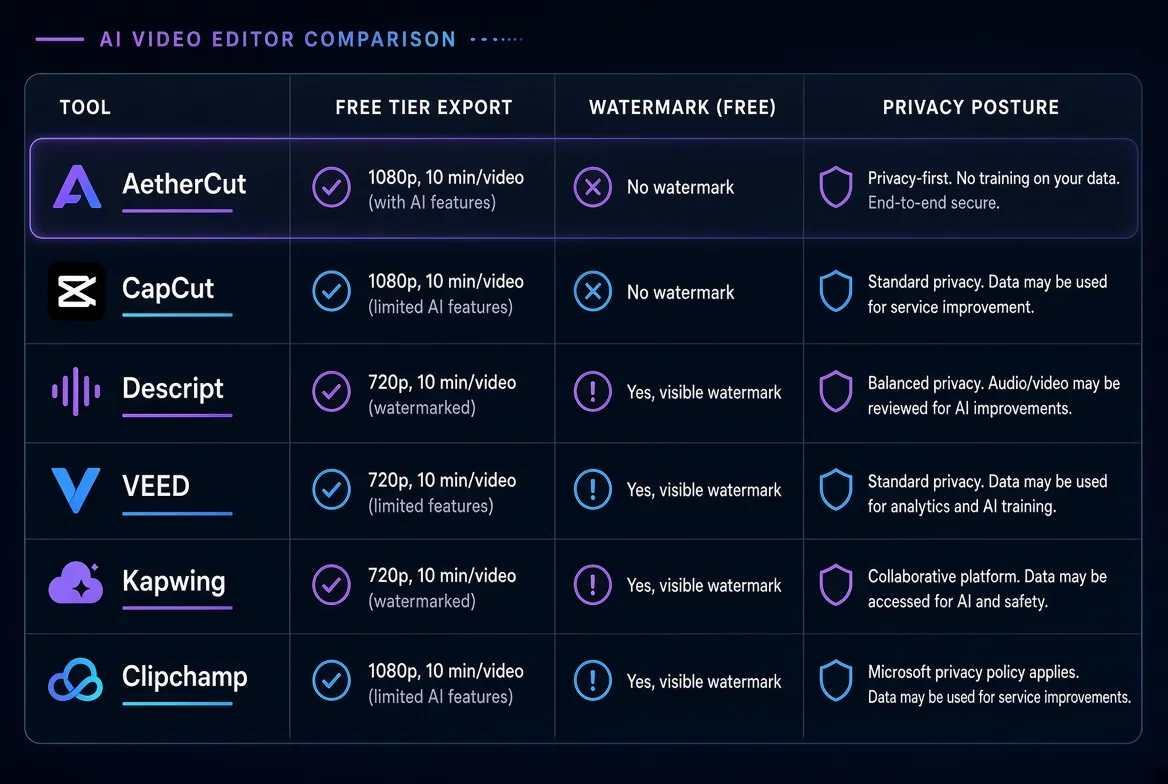
The best good free video editor for Mac in 2026 is the one that leaves your footage on your machine, exports 4K without a watermark, and runs on hardware you already own. We scored five editors, AetherCut included, on the same five criteria so you can pick one in under ten minutes.
A good free editor passes five checks: no watermark on export, no resolution cap, a learning curve measured in minutes, hardware requirements your Mac already meets, and a data flow you can verify. Most free tiers fail the first two — Descript, CapCut, Clipchamp, Kapwing, and VEED all reserve their cleanest exports for paid plans, so read each vendor's plan page before committing (Descript's pricing page is one example of where the free-tier limits live).
We score every editor on watermark policy, export resolution ceiling, time-to-first-cut, macOS and RAM requirements, and where your footage physically goes during editing.
For lawyers, clinicians, and journalists, the first four criteria are irrelevant if the tool ships footage to a third party. Open DevTools, watch the Network tab, and count outbound video bytes. AetherCut's no-account editor processes client-side, so that count is zero — a claim you can verify yourself rather than take on faith.
Every editor runs the same gauntlet: one 4K H.265 source clip, one task list (trim to 30 seconds, add auto-captions, export at source resolution), and a stopwatch on the learning curve. No exceptions, no special settings.
The clip is a 60-second 4K file, so each tool has to handle real footage, not a downsized demo reel. Scoring covers watermarks, export caps, system requirements, and where the footage physically goes. A tool that wins on features but fails the privacy check scores lower than one that does less but keeps bytes local.
For the data-flow check, we open Chrome's Network tab, load the clip, and watch for outbound requests during trimming, captioning, and export. If video bytes leave the machine, we flag it, because for deposition or patient footage that is disqualifying. AetherCut processes everything client-side through the File System Access API, so the Network tab stays quiet; the details are in our offline video editor breakdown.
Most free editors in this comparison export without a watermark, but the bigger split is export resolution and where your footage physically goes. A watermark you can crop is an annoyance; a 1080p cap or a forced upload is a workflow problem.
| Editor | Watermark on free tier | Export cap | Learning curve | Runs on |
|---|---|---|---|---|
| AetherCut | None, any tier | 4K | Moderate (full timeline) | Browser, macOS 13+ |
| iMovie | None | Up to 4K | Low | macOS 11+ (per Apple's iMovie page) |
| CapCut | None on most exports | 4K | Low | Browser or Mac app |
| Clipchamp | None | Up to 4K with paid tier | Low | Browser |
| Kapwing | Free exports carry a watermark | 1080p or lower on free | Low | Browser |
| Descript | None on video | 1080p on free | Low | Mac app |
Kapwing is the clear watermark offender; the others export clean. iMovie remains the only option here with zero cost forever and no account requirement, though it is single-track video.
This is the column that matters for deposition, patient, or source footage. iMovie processes everything locally, which is why it stays the default answer for privileged material on a Mac. Every browser-based option in the table except AetherCut relies on vendor servers for processing or collaboration, which is disqualifying under HIPAA or privilege rules for many teams.
AetherCut processes locally in the browser via WebCodecs, so footage never leaves the machine; we score it honestly as the newest and least battle-tested option here, with a smaller feature set than a desktop NLE. If your footage is confidential, the deeper breakdown of handling privileged material is in our confidential footage guide.
AetherCut is the pick for a first-time editor. There is nothing to install, footage stays on your machine (open DevTools and watch the Network tab while you work), and the multi-track timeline behaves the way tutorials expect. No watermark on any tier, so a trial project never looks like a draft.
Here is a worked example: trim a 10-minute talking-head clip to 90 seconds and add captions.
If you get stuck, the timeline shortcuts match the conventions from CapCut and Descript, so muscle memory carries over.
For footage covered by HIPAA, attorney-client privilege, or an NDA, the only safe test is physical: does any video byte leave your machine? Editors that run processing in the browser can keep footage local. AetherCut is built this way: it uses WebCodecs for decoding and encoding video entirely client-side, so the timeline, auto-captions, and 4K export all run on your Mac without a round trip to a vendor's servers.
CapCut, Descript, Clipchamp, Kapwing, and VEED all depend on shared infrastructure for transcription, collaboration, or rendering, which means footage moves off your machine as part of normal operation. For a deposition clip or patient recording, that is a disclosure event regardless of their contract terms. If your workflow needs a no-watermark export on a free tier, AetherCut's free editor without watermarks covers that too.
Don't take any vendor's word, including ours. Open DevTools, go to the Network tab, filter for media types, and load a project. Watch the Size and Domain columns while scrubbing the timeline and exporting. Any request carrying megabytes of video to a third-party domain is your footage leaving. Do this before the first frame of privileged material touches the editor, not after.
Browser-based editors like CapCut, Clipchamp, Descript, Kapwing, and VEED need little disk space, but rendering happens on your machine regardless, so treat 8 GB RAM as the practical floor and 16 GB for 4K timelines. They run on any macOS that still gets Chrome or Edge updates.
AetherCut shifts encoding to WebCodecs and compositing to WebGPU, so a 2020 Intel MacBook Air can cut 1080p, but expect dropped frames previewing 4K. Trim first, then export.
Desktop-class free editors are heavier: plan for 16 GB RAM and a macOS version from the last three years for smooth 4K scrubbing. On underpowered machines, every editor here survives if you work with proxies or lower-resolution copies instead of original footage.
Chromebooks cannot run desktop Mac editors like DaVinci Resolve, so this question is really about which browser-based tools survive on ChromeOS. AetherCut runs in any Chromium browser, and ChromeOS supports WebCodecs, so client-side editing works the same way it does on your Mac. Clipchamp and CapCut also run in a Chrome tab, but both browser-based tools send footage to vendor servers, which fails the same compliance test it fails on macOS. The practical differences on ChromeOS are hardware: many Chromebooks ship with 8 GB RAM and integrated graphics, so 4K timelines scrub slowly and exports take longer than on an M-series Mac. If your Chromebook has 16 GB RAM and a recent Intel or AMD chip, treat it as a viable backup machine for the same privacy-first workflow.
Pay when three things happen. First, multi-track complexity: if you need more than a handful of video tracks with constant keyframing, a free timeline will slow you down. Second, 4K multi-cam sync across three or more angles, which most free editors handle poorly. Third, real-time collaboration with shared project state, which requires a server and therefore breaks a no-uploads guarantee. If confidentiality is your constraint, collaborate by passing project files, not by paying for a shared cloud workspace.
Honest scorecard: AetherCut's free tier has no watermark and keeps every byte on your machine, verifiable in DevTools. But it caps export length on the free tier, its auto-captions run Whisper locally and take longer than a server would, and it has no real-time multiplayer. If shared live projects matter more than privacy, Descript or Kapwing fit better.
Yes. iMovie exports clean at up to 4K and costs nothing. AetherCut also puts no watermark on any tier. CapCut, Clipchamp, and Descript export without watermarks on their free tiers, though Descript caps at 1080p. Kapwing is the exception: its free exports carry a watermark, which you would need a paid plan to remove.
iMovie is the obvious one: it ships with macOS, needs no sign-up, and keeps footage local. AetherCut also works with no account; you open it in a Chromium browser and drag footage straight onto the timeline. Everything else in the comparison, including CapCut, Descript, Clipchamp, and Kapwing, requires signing in before you can export.
Yes, with caveats. Treat 8 GB as the practical floor for any editor in the comparison, and expect smooth work only at 1080p. AetherCut can cut 1080p on a 2020 Intel MacBook Air because encoding runs through WebCodecs. For 4K timelines, plan on 16 GB, or work with lower-resolution copies and export from the original footage.
Most do. CapCut, Descript, Clipchamp, Kapwing, and VEED depend on vendor infrastructure for transcription, collaboration, or rendering, so footage moves off your machine during normal use. AetherCut is the exception: processing runs client-side through WebCodecs and the File System Access API. Verify any vendor yourself by watching the Network tab in DevTools during a project.
For most YouTube work, yes. It exports up to 4K with no watermark, requires no account, and runs locally, which makes it the safest option for footage you cannot share. The main limit is single-track video, so multi-cam edits, heavy keyframing, or shared projects will push you toward a fuller timeline editor.
Thanks for rating!